Preview Message for Chatbot
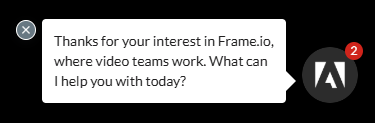
It would be cool to have a preview message come up above the chatbot widget on a website, asking the visitor if they need anything. This could be an option similar to ‘Autolaunch Popup Widget’, but instead you could have an ‘include preview message’ that you can type out yourself.
Additionally, you could set a delay so that it comes up 5-10 seconds after the page is loaded.
The point is that it’s a more subtle way to get the user to click on the chatbot instead of having to auto launch the whole widget. See the example below.
Log in to comment and vote
Comments4
Habeen Jun
Dec 10, 2024
Hey, there’s no delay option but you can acheive this using our “Popup Message” option. Can you check it out and let me know if “Pop up Message” does the job for your use case?
Josh Rentenaar
Dec 10, 2024
Hey Habeen, thanks for the response. I did try that out before posting, but couldn’t get it working.
Am I doing something wrong in this screenshot? I can send you the project ID too if that helps. If Autolaunch has to be on for it to work, that wouldn’t be ideal since I want the pop up message to be more subtle - instead of opening the whole chatbot.
I might also make a new feature request for this but I think an option to make the Autolaunch Popup only come up on the initial website load, rather than with every new page on the site. Maybe this is already possible within ChatDash?
Thanks,
Josh
Josh Rentenaar
Dec 10, 2024
I managed to get the preview message working, but it only comes up once I have opened the chatbot, clicked ‘Start New Chat’, and then refreshed the page. I don’t know, I could make this work, but it still feels quite complicated.
Habeen Jun
Dec 13, 2024
I will look into this and get back to you. It’s supposed to display pop up message.